
The Legacy Report Manager is used to run and manage legacy reports provided through the Logi Analytics Platform, including scheduling report delivery. It lists all available legacy reports, regardless of whether they are displayed in the Management Portal navigation. Built-in reports are organized into categories to help you filter and locate reports.
This feature has been deprecated and will be removed in a future release. Existing built-in reports and custom reports continue to be supported as described in this section. For information about the replacement reporting capabilities, see Reports.
Legacy Reports → Legacy Report Manager
Built-in Reports
Built-in legacy reports are included with Keyfactor Command and are organized into categories in the Legacy Report Manager. Although the report definitions cannot be modified, you can configure report settings, schedule report deliveries, run reports on demand, and mark reports as favorites.
 Modify a Built-in Legacy Report and Schedule a Legacy Report for Delivery
You can modify how a report displays, change the parameter A parameter or argument is a value that is passed into a function in an application. definitions for running a report and add or change the schedules used to deliver the report.
To edit an existing report:
- On the Report Manager page on the Built-in Reports tab, select a report to modify and choose Edit from the toolbar or the right-click menu.
-
In the Report Manager dialog, edit the available options as needed.
Details TabCommon edits to make for an existing report include:
- Show in Navigator. Turn on or off to show or hide the report under Legacy Reports in the navigator The Navigator is the Keyfactor Command left-hand (newer versions) or top (older versions) navigation menu. Certificate collections and reports can be configured to be added to the menu using user-defined Show in Navigator settings..
- Favorite: Turn on or off to add or remove the report from the Favorite category.
- Ignore Renewed Certificates: Available only for reports that use collections to enable de-duplication (see the tip below). By default, this option is turned on for expiration reports.
The Uses Collection field is informational only. It is selected and unavailable for reports that use collections.
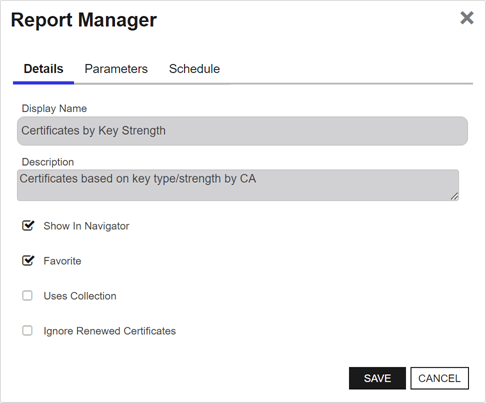
Figure 94: Edit a Built-in Report in Report Manager Details Tab
Tip: When de-duplication is turned on for a report, the report results will include only the most recently issued certificate if there is more than one certificate that matches the de-duplication criteria. De-duplication is turned on for a report with the Ignore Renewed Certificates option on the Details tab of the report configuration. De-duplication can only be turned on for reports that use certificate collections—the Uses Collection setting on the Details tab. The Uses Collection setting is not user-configurable.De-duping is configured on a certificate collection
The certificate search function allows you to query the Keyfactor Command database for certificates from any available source based on any criteria of the certificates and save the results as a collection that will be available in other places in the Management Portal (for example expiration alerts and certain reports). by setting the Ignore renewed certificate results by option when saving a certificate collection (see Save Search Criteria as a Collection). Certificate collections may be configured to be de-duplicated based on the certificate common name A common name (CN) is the component of a distinguished name (DN) that represents the primary name of the object. The value varies depending on the type of object. For a user object, this would be the user's name (for example CN=John Smith). For SSL certificates, the CN is typically the fully qualified domain name (FQDN) of the host where the SSL certificate will reside (for example servername.keyexample.com or www.keyexample.com)., distinguished name, or principal name (or not at all). Only certificates that share all the EKUs (for example, Client Authentication and Server Authentication) as well as the same CN A common name (CN) is the component of a distinguished name (DN) that represents the primary name of the object. The value varies depending on the type of object. For a user object, this would be the user's name (for example CN=John Smith). For SSL certificates, the CN is typically the fully qualified domain name (FQDN) of the host where the SSL certificate will reside (for example servername.keyexample.com or www.keyexample.com)., DN A distinguished name (DN) uniquely identifies an entry in an LDAP/X.500 directory by specifying a sequence of relative distinguished names (attribute=value pairs) from the entry up to the directory root. It’s written as a comma-separated string—for example: cn=Alice,ou=People,dc=keyexample,dc=com—with the specific attributes defined by the directory’s schema. or UPN will be eliminated as duplicates. If a certificate has more than one EKU and at least one EKU does not match an otherwise similar certificate with matching CN, DN or UPN, it will not be eliminated.For example, if the de-duplication logic was set to DN and the report would include these two certificates:
Certificate one:
- DN: CN=appsrvr14.keyexample.com,OU=IT,O=Key Example, Inc.,L=Chicago,ST=IL,C=US
EKUs: Server Authentication
Issued Date: December 1, 2025
Expiration Date: January 1, 2027
Certificate two:
DN: CN=appsrvr14.keyexample.com,OU=IT,O=Key Example, Inc.,L=Chicago,ST=IL,C=US
EKUs: Server Authentication
Issued Date: December 15, 2025
Expiration Date: December 14, 2026
The de-duplication logic would be triggered because the DNs and EKUs match. The report would include certificate two and leave out certificate one. Notice that certificate two is retained even through certificate one expires after certificate two. This is because certificate two was issued after certificate one.
Now imagine that the de-duplication logic is set to CN and the report would include these two certificates:
Certificate one:
DN: CN=appsrvr14.keyexample.com,OU=IT,O=Key Example, Inc.,L=Chicago,ST=IL,C=US
EKUs: Server Authentication
Issued Date: December 1, 2025
Expiration Date: January 1, 2027
Certificate two:
DN: CN=appsrvr14.keyexample.com,OU=HR,O=Key Example, Inc.,L=Chicago,ST=IL,C=US
EKUs: Server Authentication, Client Authentication
Issued Date: December 15, 2025
Expiration Date: December 14, 2026
Although the DNs for these certificates do not match, the CNs still do, so this matches the de-duplication logic of CN. However, the EKUs for these two certificates do not match, since only one of them includes Client Authentication. In this case, both certificates would appear on the report.
Parameters TabThe Parameters tab lists the parameters for the selected report and lets you configure default values used when the report is run manually or on a schedule. You can also change the display name and description for most parameters. Parameters of type Templates use a fixed display name and cannot be renamed.
To edit a parameter, double-click it on the Parameters tab or select it and choose Edit. Only editable fields are active.
Changes have the following effects:
- Display Name: Updates the parameter name shown on the Parameters tab and in the Schedule dialog when adding or editing a schedule.
- Default Value: Sets the value used when the report is run manually and the default value when creating a new schedule.
Tip: Some reports parameters use the Add/Edit button at the bottom of the dialog to open a Default Value dialog for to populate that parameter.Note: The parameter fields will vary depending on the report selected. The parameters shown correspond to the specific parameters for each report.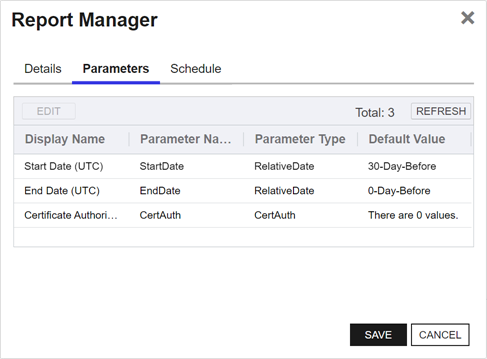
Figure 95: Edit a Built-in Report in Report Manager Parameters Tab
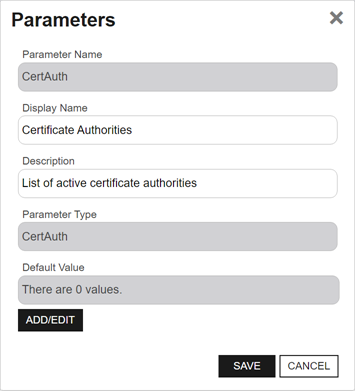
Figure 96: Edit a Built-in Report in Report Manager Parameters Tab: Parameter Details
Schedule TabTo manage report deliveries, select the Schedule tab, then use Add, Edit, or Delete. Existing report deliveries are listed on this tab. You can create multiple deliveries for the same report, each with different parameters and recipients.
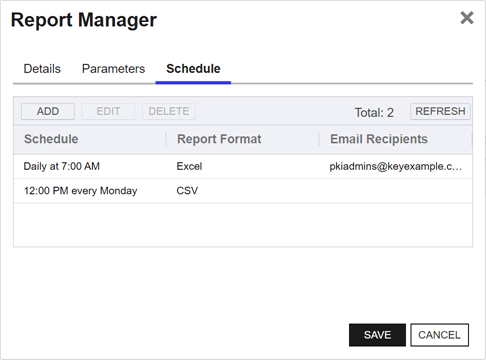
Figure 97: Edit a Built-in Report in Report Manager Schedule Tab
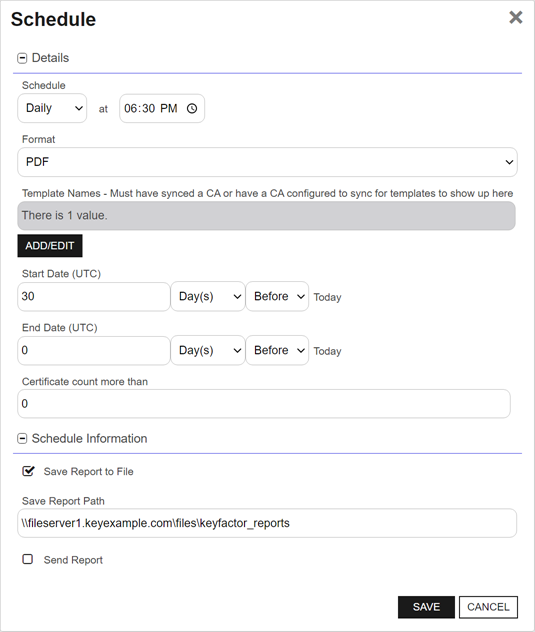
Figure 98: Edit a Built-in Report in Report Manager Schedule Tab: Add/Edit Page
Note: Report scheduling is limited by collection permissions. Users in roles that have Reports: Read and Modify permissions will also need to have Read collection permissions on individual collections or global Read permissions for Certificates to have the ability to add, edit, and delete schedules associated with collections. Any users without global Read permissions for Certificates will not have access to add, edit, and delete schedules for any collections for which they do not have collection Read permissions in addition to Reports permissions.Details Section
- Schedule: Choose a delivery frequency (Daily, Weekly, or Monthly), then specify the day or date and the time to run the report.
-
Report Format: The available report formats are PDF, Excel, and CSV.
Note: The CSV format is only available on reports that contain all the data within a single section (such as the Certificates in Collection report) rather than broken out into multiple sections (such as the Expiration Report).Note: *CSV format is not available for custom reports with multiple tables. -
Dynamic Parameters:
The available parameters depend on the selected report. Configure any required values before saving the report delivery.
Common parameters include:
- Certificate collection: Some reports are based on a certificate collection and require you to select one.
- Evaluation date: Some reports let you specify a date other than the current date. For example, you can run an Expiration Report using a date one month in the future to preview upcoming certificate expirations or compare results from different points in time.
- Certificate metadata: Some reports let you include custom certificate metadata Metadata provides information about a piece of data. It is used to summarize basic information about data, which can make working with the data easier. In Keyfactor Command, the certificate metadata feature allows you to create custom metadata fields that allow you to tag certificates with tracking information about certificates. (see Certificate Metadata) in the report output.
- Templates or certification authorities (CAs): Some reports let you limit the output to specific templates or CAs.
Schedule Information Section
-
Save Report to File:
Note: The path for saved reports must be provided in UNC format (\\servername\sharename\path) and must be accessible from the Keyfactor Command server. In addition:- Do not use a trailing "\" in the report path.
- Ensure that the service account for the Keyfactor Command Service has permission to write to the output location.
- To run a scheduled report soon after creating it, schedule it to run at least 10 minutes in the future. To run it sooner, restart the Keyfactor Command Service.
Important: If you have more than one Keyfactor Command server associated with the same instance of Keyfactor Command, you can encounter a scenario where the report is scheduled while connected to one server and the Save Report Path is validated for that server but when the job runs, it is run by another server. If the Save Report Path is not valid for that other server, the report generation will fail. Keyfactor recommends using a shared path that is available to all instances of Keyfactor Command when scheduling reports in this case. If this is not possible or desired, you may be able to use a load balancer with a sticky session.Note: This option is not supported for Keyfactor Command installations in a container. -
Send Report: You can choose to deliver your report via email using the Send Report option. If you select this, you must provide at least one recipient in the Recipients table.
In the Recipients table, click Add to create a new recipient entry. You can add multiple recipients to each
-
To include multiple recipients on the same email, where all recipients of the email will be able to see who the other recipients are, add them in a single row, separated by commas or semicolons (for example, user1@keyexample.com, user2@keyexample.com).
-
To send to multiple recipients in separate emails, where all recipients will receive separate email messages appearing as though there were no other recipients, add them on separate rows.
Edit or delete a recipient by selecting it and using the action buttons on the toolbar.
Tip: Keyfactor Command sends SMS (text) messages by leveraging the email to text gateways that many major mobile carriers provide. Check with your carrier for specific instructions. Keyfactor has tested that AT&T can be addressed using 10-digit-number@txt.att.net (for example, 4155551212@txt.att.net) and Verizon can be addressed using 10-digit-number@vtext.com (for example, 2125551212@vtext.com). T-Mobile can be addressed using 10-digit-number@tmomail.net (for example, 2065551212@tmomail.net), but functionality can be spotty. Reliability of alerting via this method depends on the reliability of the carrier’s gateways. -
Note: For a scheduled report (single-table, in csv or excel format), if no data is generated, the email will not have an attached report. Instead, a message will be shown stating no data was found with the report name.Important: Scheduled reports will not run if the Keyfactor Command Service is stopped. - Show in Navigator. Turn on or off to show or hide the report under Legacy Reports in the navigator
- Click Save to save the new or changed report details.
Run a Built-in Legacy Report
You can run a report on demand from the Report Manager page, including reports that do no appear in the navigator.
To run a report:
- On the Report Manager page on the Built-in Reports tab, select the report to run, and choose Run Report from the toolbar or the right-click menu.
- Populate the parameters as desired (see Parameters Tab for more information).
- Click Generate. The report will display immediately in the open window. The report can be exported in Excel, PDF, or CSV format as available for that report via the Export button at the end of the report.
Favorite or Unfavorite a Built-in Legacy Report
When you mark a report as a favorite, it is included in the Favorite category, which allows you to use the Select Category dropdown to select the Favorite category and display only those reports marked as favorite.
To favorite or unfavorite a report, on the Built-in Reports tab, select the report and choose Favorite or Unfavorite from toolbar or the right-click menu.
Custom Reports
Custom legacy reports are references to reports hosted by an external reporting solution, such as SQL Server Reporting Services (SSRS). Before adding a custom report in Keyfactor Command, create it in the external reporting solution and identify the URL used to execute it remotely.
Add or Modify a Legacy Custom Report
To add or edit a custom report:
- On the Report Manager page on the Custom Reports tab, select Add from the toolbar to create a new custom report, or Edit from either the toolbar or right-click menu, to modify an existing one.
- In the Report Manager dialog, set the Display Name for the report. This name appears in the navigator if you set the report to Show In Navigator.
- Enter a Description for the report. This appears on the report manager table.
- Enter the Custom URL that should be used to execute the report if you select Run Report from the report manager page or select the report from the navigator.
- Show in Navigator. Turn on or off to show or hide the report under Legacy Reports in the navigator.
- Favorite: Turn on or off to add or remove the report from the Favorite category.
- Click Save to save the report settings.
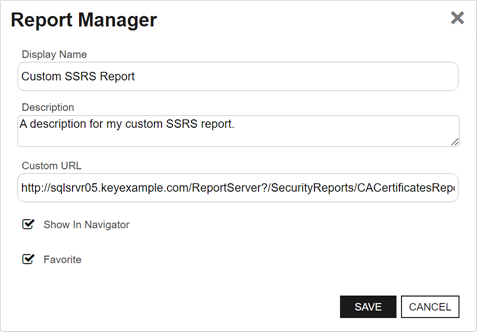
Figure 99: Add or Edit a Custom Report in Report Manager
Delete a Legacy Custom Report
To delete a report, on the Custom Reports tab, select the report to delete and choose Delete from the right-click menu.
Run a Legacy Custom Report
You can run a custom report on demand from the Report Manager page, including reports that do no appear in the navigator.
To run a report:
- On the Report Manager page on the Custom Reports tab, select the report to run and click Run Report from the toolbar or the right-click menu.
- A new tab will open with your external report displayed.
Favorite or Unfavorite a Legacy Custom Report
When you mark a report as a favorite, it is included in the Favorite category, which allows you to use the Select Category dropdown to select the Favorite category and display only those reports marked as favorite.
To favorite or unfavorite a report, on the Custom Reports tab, select the report and choose Favorite or Unfavorite from toolbar or the right-click menu.
Was this page helpful? Provide Feedback